

Modern church services often depend on clear and well-organized visual presentation. Worship lyrics, Bible passages, announcements, sermon materials, photos, and videos all need to appear on the screen at the right moment. When these elements are prepared separately or controlled through several different applications, even a simple service can become unnecessarily complicated.
WorshipScreen is designed to make this process easier. It is a browser-based church presentation platform that brings worship songs, Bible verses, slides, images, videos, backgrounds, and a service timer into one workspace. The service can be used without installing traditional desktop presentation software, making it particularly practical for churches that want a straightforward solution for weekly worship services.
For churches looking for free worship software WorshipScreen, the platform provides the core tools needed to prepare and operate a visual presentation without requiring a complicated production system.
What Is WorshipScreen?
WorshipScreen is church presentation software created specifically around the needs of worship teams and church media volunteers. Instead of creating a separate presentation file for every service, a church can build a reusable library of songs and then create individual playlists for different services.
The main idea is simple: prepare the visual content before the service, organize it into a playlist, connect the computer or browser to the church display, and control the presentation while the service is taking place.
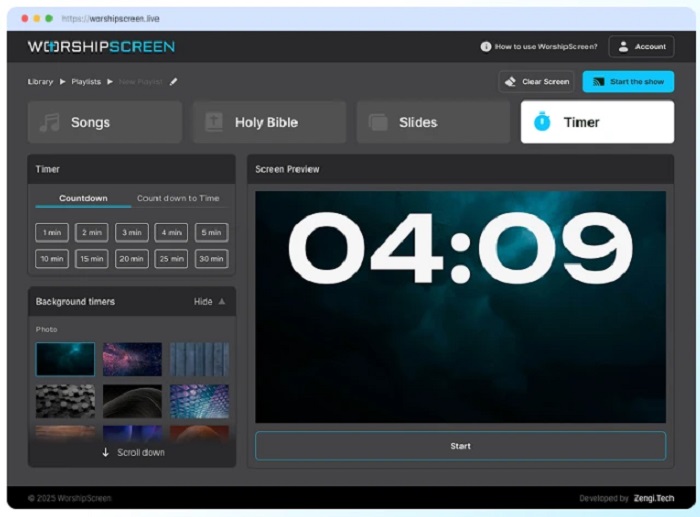
The platform includes four main working areas: Songs, Bible, Slides, and Timer. Songs can contain lyrics and backgrounds, the Bible section can be used for Scripture passages, Slides can contain announcements and other media, and the Timer can provide a countdown before the service or between different parts of the program.
This makes WorshipScreen a universal visual tool for churches rather than simply a program for displaying song lyrics.
Why a Browser-Based Church Presentation Tool Can Be Useful
One of the practical advantages of WorshipScreen is that it works in a web browser. There is no traditional desktop application that needs to be installed on every computer used by the church. A church can prepare content using a computer and, depending on the setup, control the presentation from a laptop, tablet, or smartphone.
This approach can be especially useful for small and medium-sized churches. Many congregations do not have a dedicated technical team, and Sunday presentations may be operated by volunteers who only use presentation software occasionally.
A simple browser-based interface reduces the number of technical steps involved. Volunteers can learn the basic workflow, prepare the service in advance, and then concentrate on following the worship leader and pastor rather than managing complicated software.
WorshipScreen is also suitable for churches with different types of display equipment. The presentation can be shown through a projector, LED screen, television, or a compatible TV browser. With an HDMI setup, the operator can use an extended desktop so that the control interface remains on the computer while the congregation sees only the presentation.
How to Start Using WorshipScreen
Getting started follows a relatively simple workflow.
First, create an account and open the WorshipScreen dashboard. After that, configure the basic appearance of the presentation. The service provides settings for fonts, text color, alignment, positioning, and default backgrounds.
It is worth setting these elements before preparing a large song collection. A consistent visual style makes the presentation easier to read and reduces the amount of repetitive work later.
The next step is to create a song library. Instead of rebuilding the same worship songs every week, the church can save songs and reuse them in future service playlists. Songs can be edited when lyrics or arrangements change.
The result is a reusable church content library that becomes more valuable over time.
Creating a Worship Song Library
The song library is one of the most useful parts of a weekly workflow.
A new song can be created by entering its title and lyrics. Once saved, it remains available for future playlists. Lyrics can be entered as a complete text block and then organized into presentation slides.
Automatic slide creation can save time, but it is still important to review the result manually. A slide that is technically correct may not always be comfortable for a congregation to read. Musical phrases should remain logical, and the amount of text on each screen should be limited.
The practical goal is not to fit as many words as possible onto one slide. The goal is to help people immediately understand what they should sing next.
Churches can also edit existing songs instead of recreating them. This is useful when a typo is discovered or when the worship team changes the arrangement of a song.
For example, a worship leader may decide to repeat a chorus, skip a verse, or return to a bridge. The presentation should reflect the version that will actually be performed rather than simply reproducing the original lyric sheet.
Creating a Playlist for a Church Service
After the song library has been prepared, the next step is to create a playlist for the upcoming service.
A playlist can be created for a Sunday morning service, youth meeting, Christmas service, Easter celebration, Bible study, prayer meeting, or another church event. Giving each playlist a clear name makes it easier to find later.
A typical playlist may contain several worship songs, Bible passages for the sermon, announcement graphics, photos, videos, and a countdown timer.
The advantage is that these materials can be prepared as part of one service workflow instead of being scattered across different applications.
For example, a Sunday service could include a five-minute countdown, three worship songs, an announcement slide, a short video, several Scripture passages, and sermon-related visual materials.
Before the service begins, the operator can review the complete presentation and make sure that every element is in the expected order.
Displaying Worship Lyrics on a Projector or TV
The technical connection between WorshipScreen and the church display depends on the equipment available.
One common option is to connect a laptop to a projector, television, or LED screen using HDMI. Using extended display mode is particularly helpful because the operator can keep the WorshipScreen controls on the laptop while the congregation sees only the presentation.
Another option is to use a compatible television with a built-in browser. In this case, the TV can act as the presentation screen while another device is used for control.
WorshipScreen also supports browser-based control from mobile devices. This means that the person operating the presentation does not necessarily have to remain at a fixed computer position. A phone or tablet can be useful when the worship leader or volunteer needs to move around the room.
Whatever setup is selected, it is important to test the connection before the congregation arrives.
Using Bible Verses During a Sermon
Church presentation software should do more than display worship songs. Scripture is an essential part of many services, and WorshipScreen includes a dedicated Bible section for this purpose.
Bible passages can be prepared before the sermon. If the pastor’s notes are available in advance, the operator can enter the expected references and organize them for the service.
For example, a sermon may include references to John 3:16, Psalm 23, and Romans 8. Preparing these passages beforehand means the operator does not have to search for them while the pastor is already speaking.
At the same time, sermons can change during delivery. A pastor may mention another passage that was not included in the original plan. WorshipScreen allows Bible verses to be added while the presentation is being managed, giving the operator flexibility when the service changes unexpectedly.
This combination of preparation and live control is important. Good church presentation software should support the service rather than force the service to follow a rigid technical plan.
Supporting Multilingual Church Services
Multilingual congregations can also benefit from the ability to display two languages.
WorshipScreen supports bilingual presentation for both worship lyrics and Bible passages. This can be useful for international churches, multicultural congregations, and services where members speak different languages.
For example, a worship song can show the original lyrics together with a translation. A Bible passage can similarly be presented in two languages.
When using bilingual content, readability becomes especially important. Two languages require more space, so the text should be concise, the font should remain large enough to read from the back of the room, and the background should provide sufficient contrast.
Using Images, Videos and Announcements
A church service is rarely limited to songs and Bible verses. Announcements, event information, photographs, sermon graphics, and videos are often part of the program.
WorshipScreen allows churches to use uploaded images and videos as well as YouTube content. These materials can be incorporated into the same overall presentation workflow.
For example, before a service begins, the screen might show a countdown. During the service, the operator can move from worship lyrics to an announcement graphic, then to a video, and later to Bible passages for the sermon.
Using one presentation environment reduces the need to switch between several unrelated programs.
However, online video content should always be tested before the service. If a video depends on YouTube or another online resource, the church should check the internet connection and playback in advance.
Backgrounds and Visual Design
WorshipScreen also allows churches to customize the visual appearance of their presentations.
A song can have its own background, including an image or video, or the church can use a consistent background style across an entire playlist. This gives churches flexibility without requiring advanced graphic design skills.
The most important principle is readability. A beautiful photograph is not useful if white lyrics disappear into a bright part of the image.
For this reason, churches should choose backgrounds that support the text instead of competing with it. A consistent visual theme can often be more effective than using a completely different style for every song.
A default background can also be configured for moments when no active content is being displayed. This could be a church logo, welcome image, Scripture reference, or another neutral visual. It creates cleaner transitions between different parts of the service.
Using the Timer Before the Service
The built-in timer can help organize the beginning of a service.
A church can use a standard countdown, such as five minutes, or set a countdown toward a specific start time. A background image or video can be used behind the timer.
For example, a five-minute countdown can tell the congregation that the service will begin shortly. A countdown to a specific time can be useful when the service always begins at a scheduled hour.
The timer is a small feature, but it can make the beginning of a service feel more organized and intentional.
Preparing Before Going Live
The most important part of using any church presentation software is preparation.
Before the congregation enters, the operator should run through the service from beginning to end. Check the song order, lyrics, Bible translations, Scripture references, backgrounds, photos, videos, and timer.
It is also important to check the presentation on the actual screen that the congregation will see. Text that looks large on a laptop may be difficult to read from the back of a church.
A complete technical check should include:
- correct service playlist;
- correct worship song order;
- complete lyrics;
- correct Bible passages and translations;
- readable fonts and backgrounds;
- working videos;
- properly framed images;
- correct timer settings;
- working projector, TV, or LED screen;
- reliable internet connection;
- appropriate default screen between service sections.
A few minutes of preparation can prevent many unnecessary interruptions during the service.
Controlling WorshipScreen During the Service
Once everything is ready, the presentation can be opened through the service management interface and placed on the church display.
The operator’s screen and the congregation’s screen should remain separate. The congregation should never see searches, browser tabs, settings, or presentation controls.
During worship, the operator should follow the music rather than simply clicking slides at fixed intervals. The next lyric should appear shortly before the congregation needs it.
The same principle applies to Bible passages. If a verse is prepared in advance, it can be selected when the pastor reaches that point. If an unexpected reference appears, the operator can add the passage while the presentation is running.
The objective is to make the visual presentation feel natural and almost invisible. When the technology works well, people concentrate on worship, Scripture, and the message rather than on the software itself.
WorshipScreen as Methodist Worship Software and a Flexible Church Tool
Different Christian denominations and traditions can have different service structures, but the fundamental presentation requirements are often similar: readable lyrics, Scripture, announcements, media, and reliable screen control.
For this reason, WorshipScreen can also be considered as methodist worship software WorshipScreen for churches for Methodist congregations that need a simple way to manage visual content during worship.
The same workflow can be adapted to Methodist services as well as other Christian traditions. Songs can be prepared in advance, Scripture can be displayed during preaching, announcements can be shown between service sections, and videos or images can support special events.
The software does not require a church to redesign its entire service. Instead, it provides a visual layer that can adapt to the way a particular congregation already worships.
A Practical Weekly Workflow
Once the initial setup is complete, a church can establish a repeatable weekly routine.
Start by updating the song library whenever a new worship song is introduced. Then create a playlist for the upcoming service and add the songs in their expected order.
Next, prepare the known Bible passages and upload any announcements, photographs, or videos. Configure the timer and review the visual backgrounds.
After that, run through the complete presentation on the actual church display.
Before the service starts, open the presentation and make sure the correct screen is visible. During the service, follow the worship leader and pastor, change slides at the appropriate moments, and use the default screen during pauses.
If the service changes unexpectedly, prepared content can be edited or new songs and Bible passages can be added when necessary.
Why WorshipScreen Can Be a Practical Choice for Churches
The main strength of WorshipScreen is its unified workflow.
Instead of treating lyrics, Scripture, videos, announcements, and countdowns as separate technical tasks, the church can prepare them in one browser-based environment. The service is designed to be accessible to volunteers and does not require advanced presentation experience.
It is also presented by its creators as free to use, with optional donations supporting continued development. Churches can therefore explore the platform without approaching it as a large software investment.
For a small congregation, this can mean a simpler Sunday setup. For a larger church, it can provide a straightforward tool for organizing recurring worship presentations.
Most importantly, the software is designed around the real rhythm of a church service: preparation before worship, live control during worship, and flexibility when the plan changes.
Conclusion
WorshipScreen is more than a simple lyrics projector. It is a universal browser-based tool for organizing the visual side of a church service. Worship teams and volunteers can use it to prepare songs, display Bible passages, manage sermon materials, show announcements, play videos, use custom backgrounds, and run countdowns from one central workspace.
The most effective way to use the platform is to prepare as much as possible before the service. Build a reusable song library, create a dedicated playlist, prepare Scripture passages, check all media, test the display, and run through the service before going live.
Once this workflow becomes routine, the technical side of worship presentation becomes considerably easier to manage. The screen can then serve its real purpose: helping the congregation follow the words of a song, read Scripture, understand announcements, and stay connected with the flow of the service.
For churches searching for a simple, flexible, and free solution for worship presentation, WorshipScreen provides a practical browser-based approach that combines the essential elements of church visual presentation in one place.